

Fusion/Wiederherstellung/en
If the device no longer runs properly, an update went wrong, or someone pulled the power during an update, the recovery app helps. It is a small program of its own in a protected area of the device that an update never overwrites. You choose on the display with big buttons and simple explanations, without a computer. Nothing changes before you have selected and confirmed it.
Two levels of protection
- Automatic, without you doing anything:
- Losing power in the middle of an update is harmless: the update is written to the other slot, the running firmware is untouched.
- A new firmware only counts as valid after 60 seconds of healthy operation. If it does not start, hangs, or the power is pulled, the previous version runs automatically after the next restart. The display shows "Update zurückgenommen" (update rolled back) once.
- The recovery app for everything else. It only starts
- when no valid firmware is left (the bootloader then falls back to it by itself),
- when you start it in the web interface (tab System, card Wiederherstellung),
- when you touch the screen at startup (the boot screen briefly shows "Zum Wiederherstellen jetzt den Bildschirm berühren"),
- when, after three crashes in a row, you tap Wiederherstellung öffnen in the notice "Das Gerät stürzt immer wieder ab" (the notice only asks, it changes nothing).
The menu on the display
At the top it says why the recovery was opened, at the bottom the state (memory card found? firmware file checked? settings backup present?).
| Button | What happens |
|---|---|
| Firmware wiederherstellen (restore firmware) | You choose the firmware (memory card or from the device), it is installed. Settings, WiFi and sensors are kept. |
| Komplett zurücksetzen (reset completely) | New firmware and factory state: WiFi, sensors and all settings are deleted. A second confirmation first, with a note about the backup on the card. |
| Nur Einstellungen löschen (only delete settings) | The firmware stays, WiFi and all settings are deleted. |
| Normal starten (start normally) | Start the existing firmware without changes. |
Sources for the firmware:
- From the memory card: the file
notfall/firmware.bin. It is checked before every use (firmware image, correct chip, correct project, length, SHA-256 sum). If a button says "nicht nutzbar" (not usable), the reason is written below it. - From the device (slot A/B): after an update the previous version is still in the other slot. It can be started again without a card.
What the recovery app looks like
The pictures come from the recovery app on the device (half resolution); version and backup details are sample data.
-
 Start: checks memory card and firmware
 -
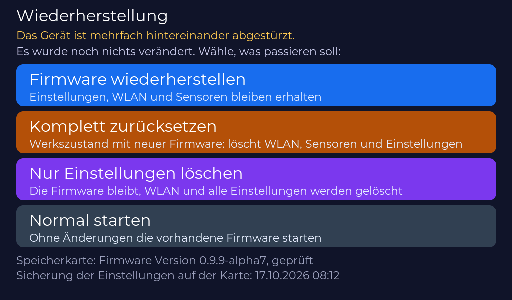 Main menu of the recovery app
 -
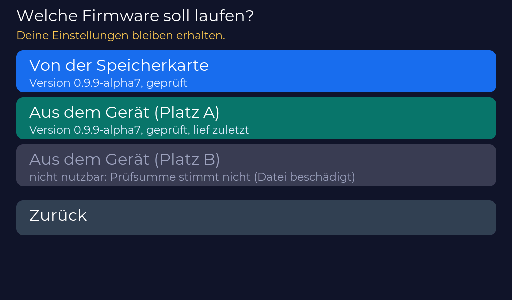 Choose firmware (memory card or device)
 -
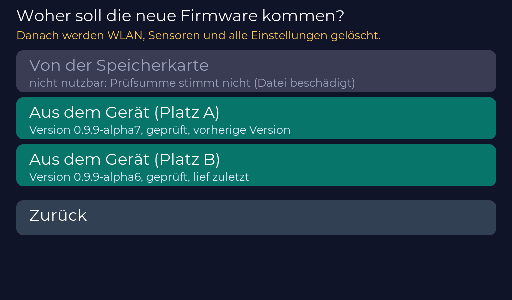 Source for “Komplett zurücksetzen” (full reset)
 -
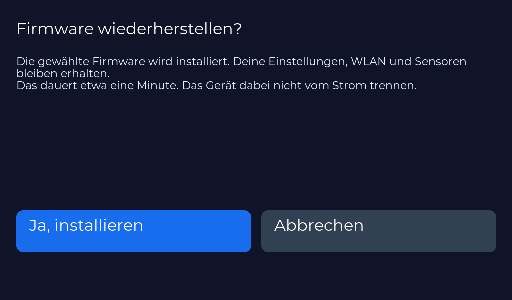 Confirmation: restore firmware
 -
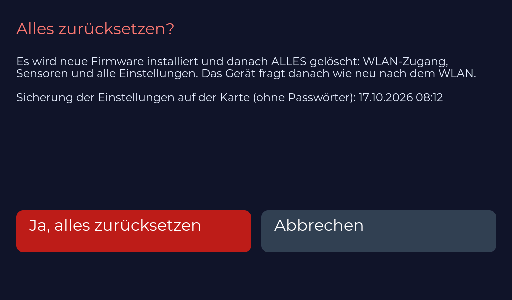 Confirmation: reset everything
 -
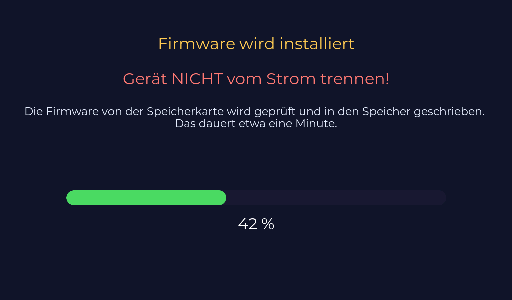 Installation in progress
 -
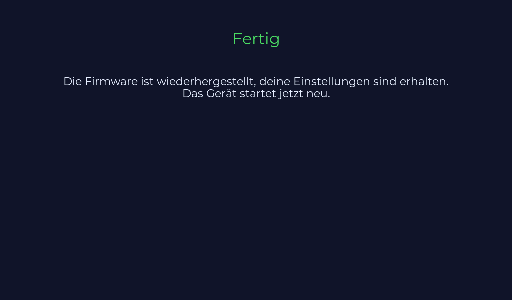 Done
Done -
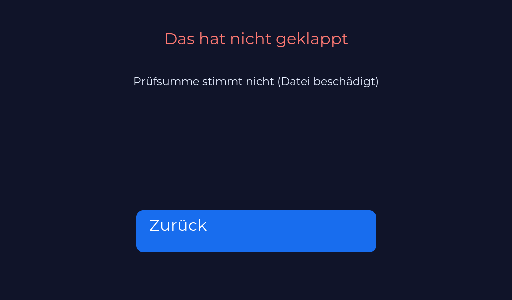 Error (here: damaged file)


The memory card makes it easy
With a microSD card in the device the preparation happens by itself (see Memory card):
- After every healthy start the running firmware copies itself as the "last good version" to
notfall/firmware.bin(only for a new version, in the background in small pieces). - Whenever the settings change, a backup without passwords is written to
notfall/einstellungen.json. After a factory reset it can be restored in the web interface (System, "Einstellungen von der Karte wiederherstellen"). WiFi access and the MQTT password have to be entered again.
You can also put a firmware.bin (from the releases) into the card's notfall folder yourself.
Install firmware from a file
Tab System, card Firmware-Update: upload a firmware.bin. The file is checked before writing, and the new firmware runs "on probation" first (see above).
Limits
- If the bootloader or the partition table is destroyed (practically only after an aborted USB flash), only a computer helps: web installer.
- The recovery app is installed via USB only (part of the full flash). Devices with the older partitioning need one full USB flash, the settings are kept.